
Xero setup and training for business owners in South Africa
Executive Summary
- Proper setup of Xero requires accurate preparation, including gathering company registration, VAT, and bank details. Correct configuration of tax rates, bank feeds, and opening balances ensures reliable financial reporting and compliance in South Africa. Regular daily use and simple account structures improve management and prevent costly errors.
Xero setup and training for business owners is the process of configuring your cloud accounting system correctly and building the practical skills to manage your finances with confidence every day. For South African small and medium business owners, this means aligning Xero with SARS VAT requirements, CIPC registration details, and local bank feeds from day one. Get the setup wrong and you spend months untangling errors. Get it right and Xero becomes the clearest financial picture your business has ever had. This guide walks you through every stage, from preparation to daily workflow, so you can run your accounting without hiring a full-time bookkeeper.
What do you need before starting Xero setup?
Preparation is the step most business owners skip. Gathering the right documents before you open Xero saves hours of backtracking later.
You need the following before you begin:
- CIPC registration details: Your company registration number and registered business name exactly as they appear on your CIPC certificate.
- VAT registration number: If you are VAT registered with SARS, this number must appear on every invoice Xero generates.
- Bank account details: Account number, branch code, and the name of your bank. You will need these to connect your bank feed.
- Opening balances: Your trial balance or balance sheet from your previous accounting system or accountant, dated to the day before you start using Xero.
- Chart of accounts: A basic list of income, expense, asset, and liability categories relevant to your business.
| Document | Why you need it |
|---|---|
| CIPC registration number | Populates your legal business name in Xero |
| SARS VAT number | Required for tax invoices and VAT returns |
| Bank account details | Needed to connect live bank feeds |
| Opening trial balance | Sets accurate starting balances in Xero |
| Chart of accounts draft | Shapes how your reports will look |
Pro Tip: Verify your VAT number on the SARS eFiling portal before setup. An incorrect number on Xero invoices creates compliance problems that are slow to fix.
How to set up Xero step by step
A thorough Xero setup typically takes 3–5 hours to complete all foundational configuration. That is not a long time, but every step matters.
Step 1: Configure your organisation details
Go to Settings > Organisation Settings in Xero. Enter your legal business name as registered with CIPC, your physical and postal address, and your VAT registration number. Set your financial year end to match your SARS tax year. Choose South African Rand (ZAR) as your default currency.

Step 2: Set your tax rates
Xero does not automatically know your VAT status. Go to Settings > Tax Rates and confirm that the standard VAT rate of 15% is active. If you are not VAT registered, set all default rates to zero-rated or exempt as applicable. Correct tax code alignment from day one is what keeps your VAT201 returns accurate and prevents SARS queries.
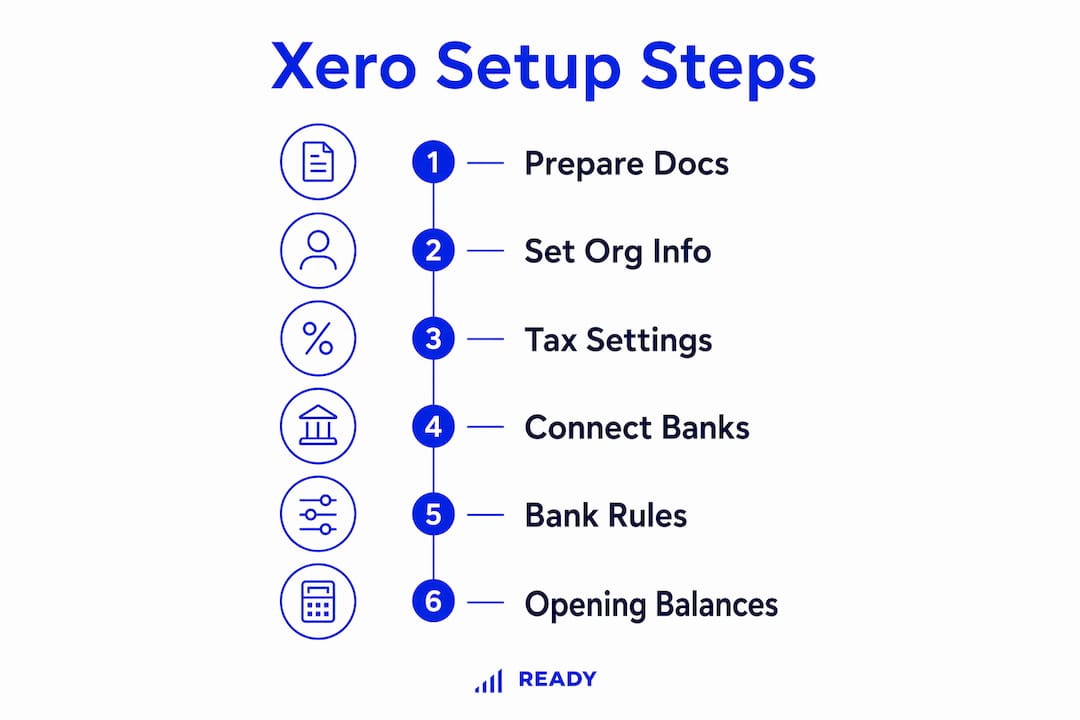
Step 3: Connect your bank feeds
Go to Accounting > Bank Accounts and add your South African bank account. Xero supports direct feeds from major South African banks including Absa, FNB, Standard Bank, Nedbank, and Capitec. Once connected, transactions import automatically each day. This removes manual data entry and gives you a live view of your cash position.
Step 4: Set up bank rules
Bank feeds bring in the transactions. Bank rules automate the categorization of those transactions. A bank rule tells Xero: “Every time you see a payment to Vodacom, code it to Telephone Expense.” You set these rules once and Xero applies them every time that transaction appears. This is where real time savings happen, even after your feeds are running.
Step 5: Enter your opening balances
This is the most technically sensitive step. Your conversion date is the date your Xero records begin. Ignoring the conversion date leads to imbalanced opening balances, which corrupts every report you run afterward. Enter your opening balances under Accounting > Advanced > Conversion Balances, using your accountant’s trial balance dated the day before your conversion date.
Pro Tip: If you are switching from another system mid-year, ask your accountant for a trial balance as at the last day of the previous month. That date becomes your conversion date.
| Setup stage | Impact on reporting |
|---|---|
| Organisation details | Legal name and VAT number appear on all invoices |
| Tax rates | Determines VAT accuracy on every transaction |
| Bank feeds | Eliminates manual entry and speeds up reconciliation |
| Bank rules | Automates recurring transaction coding |
| Opening balances | Anchors balance sheet accuracy from day one |
How do you train yourself or your team on Xero?
Xero accounting training falls into two categories: free self-paced learning and structured paid courses. Both have a place depending on your starting point.
Free official training via Xero Central
Xero Central is Xero’s own learning hub. It offers free, self-paced courses covering invoicing, bank reconciliation, payroll, and VAT returns. You can earn an official Xero certification at no cost. This is the right starting point if you are comfortable learning from videos and written guides on your own.
Structured third-party courses
Structured third-party courses offer practical exercises and tutor support that free certifications do not provide. They are worth the investment if you are a complete beginner or if you need to train a bookkeeper who will manage your accounts daily. Professional Xero trainers typically charge the equivalent of R14,000–R35,000 per day, while accountant-led half-day sessions cost considerably less and are often more practical for small teams.
Xero’s Demo Company
Every Xero account includes a Demo Company. This is a practice environment with pre-loaded data where you can test invoicing, reconciliation, and reporting without touching your real accounts. Use it before going live.
Xero Coaches program
Xero offers a Xero Coaches program in select markets, providing one-on-one onboarding support for new users during their first 90 days. The program focuses on bank feeds, workflow training, and getting comfortable with the Xero ecosystem. Check availability for South African accounts directly with Xero.
- Use Xero Central for free certification and foundational knowledge.
- Use the Demo Company to practice before working on live data.
- Use a structured course or accountant-led session if you are a beginner or training staff.
- Check whether the Xero Coaches program is available for your account.
Pro Tip: Complete the Xero “Getting Started” course on Xero Central before your first reconciliation. It takes under two hours and prevents the most common beginner errors.
What setup mistakes do South African business owners make in Xero?
Most Xero problems trace back to a handful of avoidable errors made during the first week of use.
Wrong conversion date
The conversion date mistake is the most damaging. If you set your conversion date incorrectly, your opening balances will not match your actual financial position. Every balance sheet and profit and loss report you run will be wrong. Fix this before you enter a single transaction.
Overcomplicating the chart of accounts
A chart of accounts with 200 line items sounds thorough. In practice, it deters daily use because every transaction requires a judgment call. A simple, functional setup that you will use consistently produces better results than a complex one you avoid. Start with 30–50 accounts covering your main income streams and expense categories.
Skipping bank rules
Business owners who connect bank feeds but skip bank rules still spend hours on manual reconciliation each month. Bank rules are the mechanism that turns a connected feed into a near-automated process. Set them up in your first week.
Neglecting VAT and payroll settings
Incorrect VAT settings cause SARS compliance problems that compound over time. Review your VAT period (monthly or bi-monthly) and confirm it matches your SARS registration. If you run payroll, configure Xero Payroll or connect a payroll add-on before processing your first pay run.
“A simple Xero setup that you engage with daily is more valuable than a perfect configuration you rarely open.”
Pro Tip: Schedule a 15-minute Xero session every morning to review the previous day’s bank transactions. Daily reconciliation takes minutes. Weekly reconciliation takes hours.
To avoid common bookkeeping mistakes that complicate your Xero records, build the habit of daily entry from week one.
Key takeaways
Correct Xero setup requires the right documents, accurate tax settings, connected bank feeds, and consistent daily use to deliver reliable financial reporting for SARS compliance.
| Point | Details |
|---|---|
| Prepare before you start | Gather CIPC details, VAT number, bank info, and opening balances first. |
| Set the conversion date correctly | An incorrect conversion date corrupts every balance sheet report you run. |
| Use bank rules from day one | Bank rules automate transaction coding and cut reconciliation time significantly. |
| Choose training that matches your level | Free Xero Central courses suit self-starters; structured courses suit beginners needing tutor support. |
| Keep your chart of accounts simple | A lean chart of 30–50 accounts encourages daily use and produces cleaner reports. |
What I have learned from setting up Xero for South African SMEs
Most business owners come to Xero expecting the software to do the thinking. It does not. Xero is a tool that reflects the quality of your inputs. If your conversion date is wrong or your VAT settings are misaligned with SARS, Xero will faithfully report incorrect numbers every single month.
The pattern I see most often is business owners who spend two days perfecting their chart of accounts and then never open Xero again after the first week. The software becomes shelf-ware. The fix is not more training. It is a simpler setup and a daily habit. Fifteen minutes every morning to review bank transactions is more valuable than a perfect configuration you never touch.
South African business owners face a specific challenge that Australian or UK guides do not address: SARS moves fast. VAT rates, filing periods, and compliance requirements change. Your Xero settings need to match your current SARS registration, not what was correct two years ago. I recommend reviewing your tax settings every time you receive a SARS correspondence, not just at year end.
The business owners who get the most from Xero are not the ones with the most complex setups. They are the ones who automate their accounting early, keep their chart of accounts lean, and treat Xero as a daily dashboard rather than a year-end filing tool. Start simple. Use it every day. Add complexity only when a specific reporting need demands it.
— Johan
How Readyaccounting helps you get Xero right from the start
Readyaccounting works with South African SMEs and startups to configure Xero correctly from day one, aligned with SARS VAT requirements and your specific business structure. The team handles organisation setup, tax rate configuration, bank feed connections, and opening balance entry so you avoid the errors that cause months of reconciliation headaches. Beyond setup, Readyaccounting provides tailored Xero training for you and your team, covering daily workflows, VAT filing, and cash flow reporting. If you want to understand how automation improves cash flow in your business, Readyaccounting’s cloud accounting services give you the infrastructure to make that happen. Contact Readyaccounting at readyaccounting.co.za to get started.
FAQ
How long does Xero setup take for a small business?
A complete Xero setup typically takes 3–5 hours covering business details, tax settings, bank feeds, and opening balances. Complex businesses with multiple accounts or currencies may take longer.
Do I need a VAT number to set up Xero in South Africa?
You only need a VAT number if you are registered for VAT with SARS. If you are not VAT registered, set all default tax rates to zero-rated or exempt in Xero’s tax settings.
What is the Xero Coaches program?
The Xero Coaches program provides one-on-one onboarding support for new Xero users during their first 90 days, focusing on bank feeds, workflows, and system navigation. Availability for South African accounts should be confirmed directly with Xero.
Is free Xero certification enough for a business owner?
Free Xero certification via Xero Central covers the fundamentals well. Structured third-party courses add practical exercises and tutor support, which helps beginners gain confidence faster than self-paced study alone.
What happens if I set the wrong conversion date in Xero?
An incorrect conversion date causes imbalanced opening balances, which means every balance sheet and profit and loss report you generate will show incorrect figures. Correct the conversion date before entering any live transactions.