

How to set up SimplePay for your business in 2026
Executive Summary
- Setting up SimplePay requires gathering business registration, SARS tax numbers, and employee data beforehand to save time.
- The platform is user-friendly, with a short learning curve, and supports direct integration with Xero and Netcash for automation.
SimplePay is defined as a cloud-based payroll and tax compliance platform built specifically for South African businesses, covering everything from SARS submissions to employee self-service payslips. Knowing how to set up SimplePay for my business is the question every South African employer asks when manual payroll finally becomes too costly to ignore. The good news: the process is structured, the learning curve is short, and the compliance benefits are immediate. This guide walks you through every stage, from prerequisites to your first live pay run, with practical tips shaped by real South African payroll requirements.
What prerequisites do you need to set up SimplePay?
Getting the right information together before you start saves hours of backtracking. The SimplePay setup guide begins long before you open a browser tab.
Gather these items before you register:
- Business registration details: Your company name, registration number from CIPC, and registered address.
- SARS tax reference numbers: Your PAYE employer number, SDL number, and UIF reference. You cannot configure payroll tax correctly without these.
- Banking information: Your business bank account details for EFT payment exports to platforms like Netcash.
- Employee data: ID numbers, tax numbers, banking details, and current salary structures for every staff member.
- Year-to-date payroll balances: If you are migrating from another system, accurate YTD balances are the primary complexity when moving mid-year. Incorrect balances break your tax filing for the rest of the fiscal year.
You also need a stable internet connection and a modern browser. SimplePay runs entirely in the cloud, so there is no software to install. Optional but recommended: set up accounts with Xero for accounting integration and Netcash for payment processing before you start, so you can connect them during configuration rather than returning later.
SimplePay’s free training modules cover navigation, company setup, employee management, and integration. Work through these before your first pay run. They are free, self-paced, and built for non-accountants.
Pro Tip: Register for SimplePay’s 30-day free trial before committing. The trial gives you full access to payroll processing, SARS compliance tools, and customer support, so you can test your exact setup at zero cost.
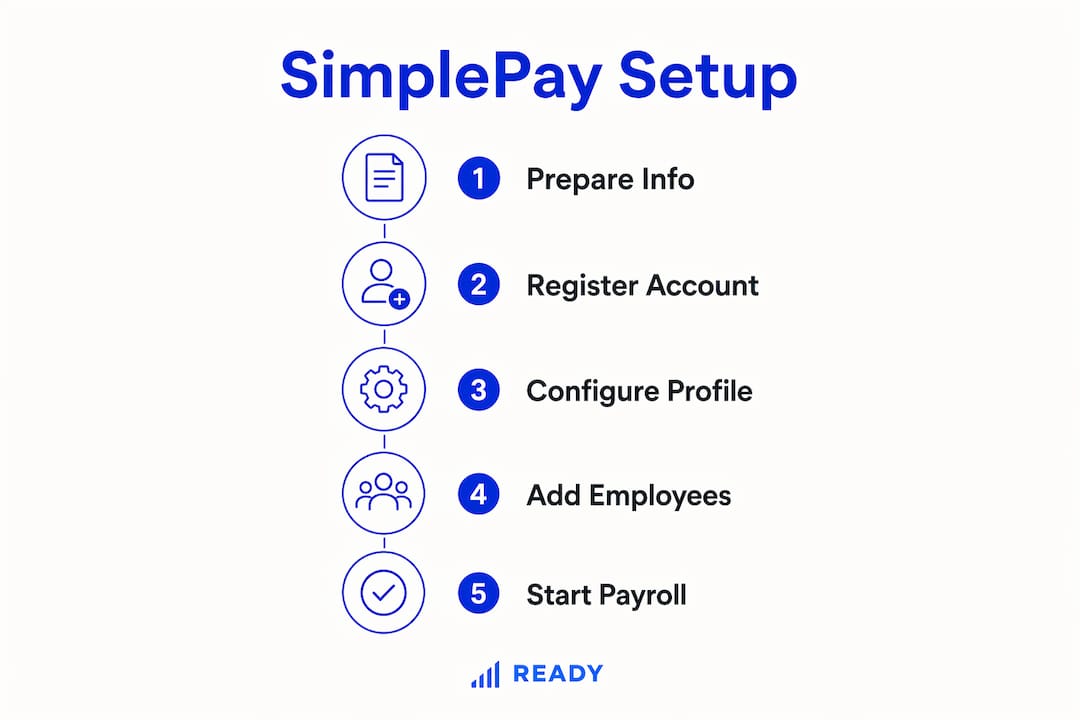
How do you register and configure your company profile in SimplePay?
The company configuration stage is where most first-time users make mistakes that cost them later. Follow this sequence exactly.
- Create your account. Go to simplepay.co.za and register with your business email. You can manage multiple companies under one login, which matters if you run more than one entity.
- Add your company details. Enter your CIPC registration number, trading name, registered address, and contact details. SimplePay uses this information to pre-populate SARS submission forms.
- Enter your SARS employer numbers. Add your PAYE, SDL, and UIF reference numbers. These link your payroll directly to your SARS employer account.
- Set your pay frequency. Choose weekly, fortnightly, or monthly. This setting drives your entire payroll calendar, so confirm it with your employment contracts before selecting.
- Configure employee number format. Decide on a numbering convention now. Changing it later creates reconciliation headaches.
- Set up leave policies. Define annual leave, sick leave, and family responsibility leave in line with the Basic Conditions of Employment Act. SimplePay applies these rules automatically during payroll processing.
- Enter tax take-on balances. If you are starting mid-year, input the year-to-date PAYE, UIF, and SDL amounts already paid. This step is non-negotiable for accurate SARS submissions.
Experienced users can complete a full company setup within minutes once they have all the information ready. The interface is designed for business owners, not just accountants.
Pro Tip: If you run multiple companies, set up each one as a separate entity within the same SimplePay account. This keeps payroll data isolated while giving you a single login for all reporting.

How do you add and manage employees within SimplePay?
Employee data accuracy determines whether your payroll is correct or not. There is no shortcut here.
Adding employees individually works well for small teams. For larger teams, SimplePay supports bulk imports via CSV file. Either way, you need the following for each employee:
- Personal details: Full name, ID number, date of birth, and contact information.
- Tax information: Income tax number and tax directive number if applicable.
- Banking details: Bank name, account number, and branch code for EFT payments.
- Remuneration structure: Basic salary, allowances, and any deductions such as medical aid or retirement fund contributions.
- Employment dates: Start date, probation end date, and any fixed-term contract end dates.
Once an employee profile is live, you can update information at any time without disrupting active pay runs. SimplePay tracks changes with an audit trail, which matters during SARS audits.
Managing terminations is straightforward. Mark the employee as terminated, enter the last working day, and SimplePay calculates the final pay including leave payout automatically. The system generates the IRP5 at year-end based on the full employment record.
Pro Tip: Set up employee self-service access from day one. Employees can view and download their own payslips, which cuts down the admin queries your HR team handles every month.
Leave balance management is built into each employee profile. SimplePay tracks accruals and deductions in real time, so your leave liability is always visible on the balance sheet. This is a detail that payroll best practices for South African SMEs consistently flag as a compliance risk when managed manually.
What are the key steps to process payroll and ensure SARS compliance?
Running your first pay cycle is the moment everything comes together. The step-by-step SimplePay setup leads here.
- Open the pay run for the relevant period. SimplePay creates pay runs automatically based on your configured pay frequency.
- Review and adjust employee earnings. Add overtime, commissions, bonuses, or any once-off payments for the period.
- Check deductions. Confirm UIF, PAYE, and any voluntary deductions are calculating correctly before finalizing.
- Process payslips in bulk. One click generates payslips for all employees. SimplePay emails them directly to employees or makes them available via self-service.
- Finalize the pay run. Once finalized, the pay run locks and generates your EMP201 return for SARS submission.
- Submit your EMP201. SimplePay produces the EMP201 declaration ready for submission to SARS via eFiling. The cloud system automatically updates tax calculations in line with current SARS and Department of Labour regulations, so you are never working from outdated tax tables.
The table below shows the key SARS submissions SimplePay supports and their standard deadlines:
| Submission | Purpose | Deadline |
|---|---|---|
| EMP201 | Monthly PAYE, UIF, SDL declaration | 7th of the following month |
| EMP501 | Bi-annual employer reconciliation | August and March |
| IRP5 / IT3(a) | Employee tax certificates | Issued at tax year-end (february) |
| UIF Declaration | Monthly UIF contribution report | 7th of the following month |
Common errors to watch for: incorrect tax take-on balances, wrong pay frequency settings, and missing SDL numbers. Each of these causes SARS reconciliation failures. Fixing them after submission is possible but time-consuming. Avoiding common payroll errors from the start is far less painful than correcting them later.
How do you integrate SimplePay with Xero and Netcash?
Integration turns SimplePay from a payroll tool into a connected financial system. The process is technical but manageable if you follow the correct sequence.
The table below compares the two main integration options available to South African businesses:
| Integration | What it does | Key requirement |
|---|---|---|
| Xero | Posts payroll journals automatically to your accounting ledger | Generate API key in SimplePay; connect via Xero add-on marketplace |
| Netcash | Exports EFT payment files for bulk employee salary payments | Configure EFT permissions before creating any pay run |
The Netcash integration has one critical rule: configure EFT permissions before you create your first pay run. If you unlock EFT access after a pay run already exists, you must delete and recreate that pay run. This disrupts your payroll workflow and wastes time.
For Xero, the process starts in SimplePay’s settings. Generate an API key, then enter it in Xero’s SimplePay integration panel. Once connected, payroll journals post to Xero automatically after each pay run is finalized. This eliminates manual journal entries and the errors that come with them.
API key security deserves attention. Generating a key with Full access links every company and pay run in your SimplePay account to that key. In a multi-company environment, this creates a data exposure risk if the key is compromised. Restrict each API key to specific companies and pay runs. This is a non-negotiable step for businesses managing payroll across multiple entities.
The benefits of cloud accounting multiply when your payroll system talks directly to your accounting platform. Real-time payroll data in Xero means your management accounts are always current, not a week behind.
Key takeaways
Setting up SimplePay correctly from the start is the single most effective way to avoid SARS compliance failures and payroll errors in your South African business.
| Point | Details |
|---|---|
| Prepare before you register | Gather CIPC details, SARS tax numbers, and YTD balances before opening SimplePay. |
| Configure EFT permissions first | Set up Netcash EFT access before creating any pay run to avoid having to delete and recreate it. |
| Restrict API keys | Limit each API key to specific companies and pay runs to protect payroll data security. |
| Use the free trial and training | SimplePay’s 30-day trial and free training modules remove the cost and risk of getting started. |
| Automate SARS submissions | SimplePay generates EMP201 and EMP501 returns automatically, keeping you compliant without manual effort. |
Why I think most South African businesses delay SimplePay longer than they should
The biggest barrier to adopting SimplePay is not technical. Montaque Swanepoel of CFO360 notes that psychological resistance is the hardest obstacle, but users almost never revert once they experience the support and ease of use firsthand. That observation matches what I see with South African SMEs every week.
Business owners assume the migration will break something. They worry about YTD balances, SARS reconciliations, and employee data. These are real concerns, but they are all solvable within the platform. SimplePay’s direct support model means you can contact the team immediately during a pay run without booking an appointment. That kind of access changes the risk calculation entirely.
The compliance automation is the part most people underestimate. When SARS updates tax tables or the Department of Labour adjusts UIF rates, SimplePay applies those changes automatically. You do not need to track legislative updates or manually adjust formulas. For a business owner already managing sales, operations, and cash flow, that is a meaningful reduction in cognitive load.
My recommendation: start the free trial during a quiet period, not in the week before payroll is due. Use the training modules. Call support with your questions. The platform rewards users who invest a few hours upfront with months of reliable, compliant payroll processing.
— Johan
How Readyaccounting helps you get SimplePay running faster
Setting up SimplePay correctly is straightforward when you know what you are doing. Getting it wrong costs you time, money, and SARS penalties. Readyaccounting works with South African SMEs and startups to configure SimplePay from scratch, migrate existing payroll data, and connect the platform to Xero and Netcash. We handle the technical setup so your first pay run is clean. Beyond payroll, our team manages VAT, SARS compliance, and financial reporting as part of a fully automated accounting system that gives you real-time visibility into your business finances. If you want SimplePay running correctly from day one, contact Readyaccounting for a consultation.
FAQ
How long does SimplePay setup take for a new business?
A new company profile can be configured within minutes once you have all your SARS numbers, banking details, and employee data ready. Most businesses complete their first pay run within the same day they register.
Can I use SimplePay if I am migrating from another payroll system?
Yes. The main requirement is entering accurate year-to-date tax and payment balances from your previous system. Incorrect YTD balances cause SARS reconciliation errors for the remainder of the tax year.
Does SimplePay handle SARS submissions automatically?
SimplePay generates your EMP201, EMP501, and IRP5 documents automatically. You still submit them via SARS eFiling, but the calculations and formatting are done for you.
Is SimplePay suitable for businesses with multiple companies?
Yes. You can manage multiple company entities under one SimplePay login. Restrict API keys to specific companies to maintain data security across entities.
What happens if I set up Netcash EFT permissions after creating a pay run?
You must delete the existing pay run and recreate it after configuring EFT permissions. Set up Netcash access before creating any pay run to avoid this disruption.
Recommended
- Payroll best practices for South African SMEs in 2026 | Ready Accounting
- How to Outsource Payroll for 2025 Success in South Africa - Ready Accounting
- Payroll compliance checklist: Easy steps for SA SMEs | Ready Accounting
- SimplePay for Payroll: Streamlining South African Business in 2025 | Ready Accounting